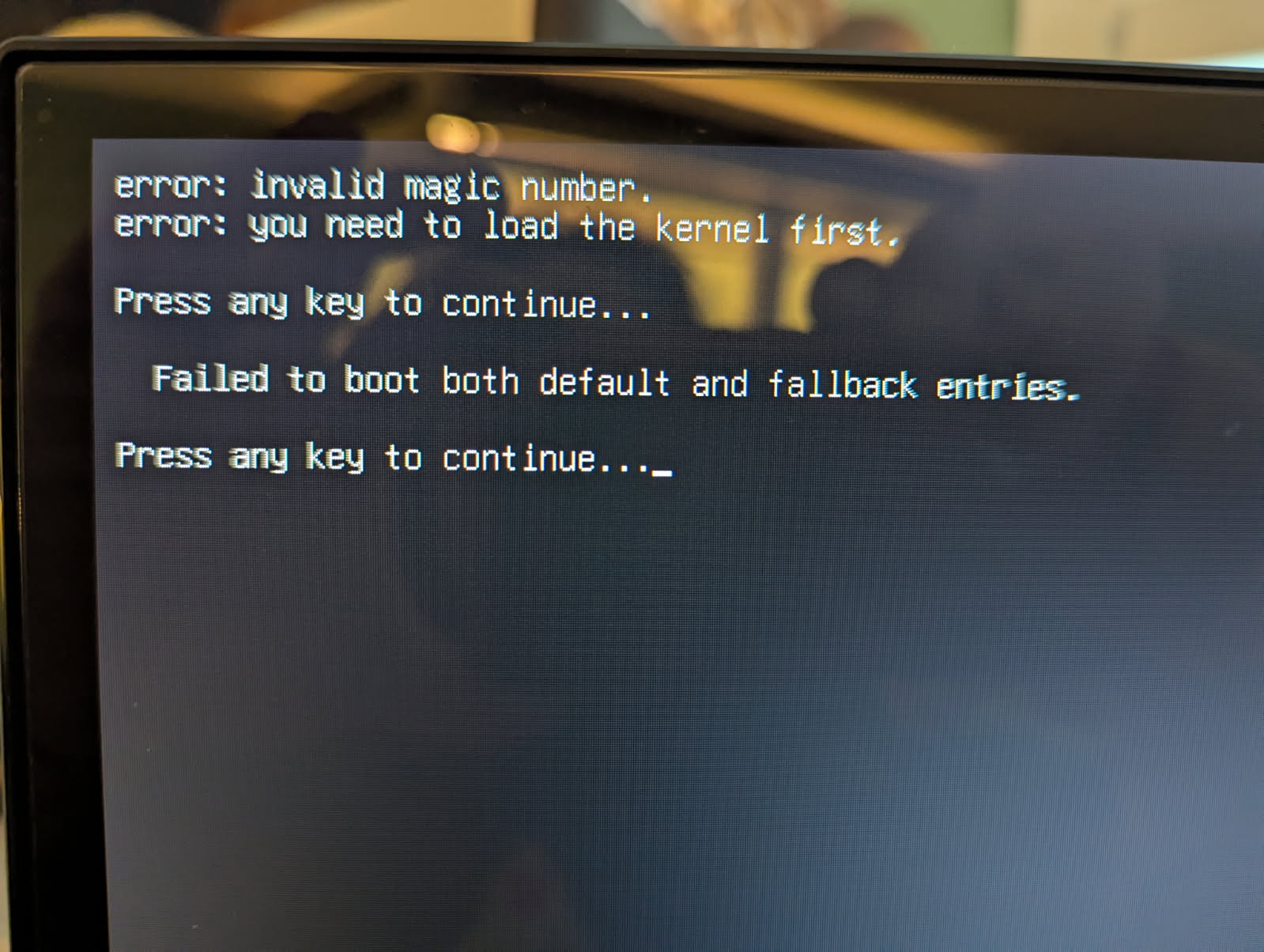
Upgrade broke everything

So the last update of headers and firmware broke my boot and i had to restore from a backup.

What gives.
These are the packages that craped out my boot sector
linux-headers-6.12.41-gfe345274f0aa
linux-image-6.12.41-gfe345274f0aa

6.1.92-15907-gf36fd2695db3
Tried to upgrade to
6.12.41-gfe345274f0aa

And destroyed the boot sector

Kernel updates do not touch the boot sector unless there’s a script that is attached to run after the kernel update or the SD card is failing. What OS are you using? You should always be able to restore the bootloader via libretech-flash-tool if it gets wiped by something else.

I can confirm that 6.12.41-gfe345274f0aa breaks the aml-s905x-cc. The issue isn’t the boot loader but the kernel itself and reflashing just the bootloader does not fix it. I booted the previous kernel via the Grub menu and it boots fine. 6.12.41-gfe345274f0aa results in “Invalid magic number”, same for 6.12.41-g2c40879474fe. Can we get these bad kernel updates removed from the repository and maybe an updated working one published? Currently stuck on 6.1.54-10001-gd517e36a604d as no others are in the repository anymore…

Can you provide a screenshot of the error with your phone? Also please provide the OS you are using. 6.1.54 is very old and our default images should be 6.1.74.

Just to triple verify, redownloaded Ubuntu Server 22.04.3: https://distro.libre.computer/ci/ubuntu/22.04/ubuntu-22.04.3-preinstalled-server-arm64%2Baml-s905x-cc.img.xz

On fresh install and first boot, it has kernel 6.1.54-10001-gd517e36a604d:

ubuntu@ubuntu-22:~$ cat /etc/os-release 
PRETTY_NAME="Ubuntu 22.04.3 LTS"
NAME="Ubuntu"
VERSION_ID="22.04"
VERSION="22.04.3 LTS (Jammy Jellyfish)"
VERSION_CODENAME=jammy
ID=ubuntu
ID_LIKE=debian
HOME_URL="https://www.ubuntu.com/"
SUPPORT_URL="https://help.ubuntu.com/"
BUG_REPORT_URL="https://bugs.launchpad.net/ubuntu/"
PRIVACY_POLICY_URL="https://www.ubuntu.com/legal/terms-and-policies/privacy-policy"
UBUNTU_CODENAME=jammy
ubuntu@ubuntu-22:~$ uname -a
Linux ubuntu-22 6.1.54-10001-gd517e36a604d #1 SMP PREEMPT_DYNAMIC Fri Sep 22 22:11:56 EDT 2023 aarch64 aarch64 aarch64 GNU/Linux

Followed this to fix the invalid signatures for apt: Signatures were invalid: EXPKEYSIG 2E5FB7FC58C58FFB

Run updates and reboot: sudo apt update; sudo apt full-upgrade; sudo reboot

Processing triggers for initramfs-tools (0.140ubuntu13.5) ...
update-initramfs: Generating /boot/initrd.img-6.12.41-gfe345274f0aa

System will no longer boot, kernel 6.12.41-gfe345274f0aa was installed as part of the updates.

Thanks for the report. It might be that the grub version is too old to support the kernel compression method. We’ll move to gzip kernel. It should be fixed in a hour.

This should be fixed now. We switched back to gzip kernel instead of zstd. Some older versions of GRUB do not support newer faster compression methods.

Just tested as I see it in the repo but the package listing for apt isn’t updated, so it wasn’t coming down via:

sudo apt update; sudo apt full-upgrade

Installed manually via:

cd /tmp
wget https://deb.libre.computer/repo/pool/main/l/linux-6.12.y-lc/linux-headers-6.12.42-g557779751902_6.12.42-g557779751902-1_arm64.deb
wget https://deb.libre.computer/repo/pool/main/l/linux-6.12.y-lc/linux-image-6.12.42-g557779751902_6.12.42-g557779751902-1_arm64.deb
wget https://deb.libre.computer/repo/pool/main/l/linux-6.12.y-lc/linux-headers-lc-lts-arm64_6.12.42-g557779751902-1_arm64.deb
wget https://deb.libre.computer/repo/pool/main/l/linux-6.12.y-lc/linux-image-lc-lts-arm64_6.12.42-g557779751902-1_arm64.deb
sudo dpkg -i linux-image-6.12.42-g557779751902_6.12.42-g557779751902-1_arm64.deb linux-image-lc-lts-arm64_6.12.42-g557779751902-1_arm64.deb linux-headers-6.12.42-g557779751902_6.12.42-g557779751902-1_arm64.deb linux-headers-lc-lts-arm64_6.12.42-g557779751902-1_arm64.deb

Still getting the same error message. Grub is 2.06:

ubuntu@ubuntu-22:~$ sudo dpkg -l | grep grub
ii  grub-common                              2.06-2ubuntu7.2                         arm64        GRand Unified Bootloader (common files)
ii  grub-efi-arm64                           2.06-2ubuntu14.8                        arm64        GRand Unified Bootloader, version 2 (ARM64 UEFI version)
ii  grub-efi-arm64-bin                       2.06-2ubuntu14.8                        arm64        GRand Unified Bootloader, version 2 (ARM64 UEFI modules)
ii  grub-efi-arm64-signed                    1.187.12+2.06-2ubuntu14.8               arm64        GRand Unified Bootloader, version 2 (EFI-ARM64 version, signed)
ii  grub2-common                             2.06-2ubuntu7.2                         arm64        GRand Unified Bootloader (common files for version 2)

We disabled all compression from the kernel itself. Try the new one. Grub also needs grub-install in order to update as it doesn’t self update from really old version. The package might not be reflective of the version you have on your /boot.

Seeing the same behavior with 6.12.42-g557779751902.

It could be that the grub version is too old and does not support btrfs zstd files in /boot. You can force compression back to gzip via

sudo btrfs property set /boot compression zlib
sudo btrfs filesystem defragment -r -czlib /boot 

Add post kernel install script to do this automatically via:

cat <<EOF | sudo tee /etc/kernel/postinst.d/zz-old-grub-zlib
#!/bin/sh
btrfs property set /boot compression zlib
btrfs filesystem defragment -r -czlib /boot
EOF
chmod +x /etc/kernel/postinst.d/zz-old-grub-zlib

Running “sudo apt update” only resulted in updates for linux-image-lc-lts-arm64 and linux-headers-lc-lts-arm64, and if I remove the previous 6.12.42-g557779751902-1, shows no updates:

ubuntu@ubuntu-22:~$ sudo apt update
Hit:1 http://ports.ubuntu.com/ubuntu-ports jammy InRelease
Get:2 http://ports.ubuntu.com/ubuntu-ports jammy-updates InRelease [128 kB]
Get:3 http://ports.ubuntu.com/ubuntu-ports jammy-backports InRelease [127 kB]
Hit:4 https://deb.libre.computer/repo linux InRelease
Get:5 http://ports.ubuntu.com/ubuntu-ports jammy-security InRelease [129 kB]
Fetched 384 kB in 3s (153 kB/s)
Reading package lists... Done
Building dependency tree... Done
Reading state information... Done
2 packages can be upgraded. Run 'apt list --upgradable' to see them.
ubuntu@ubuntu-22:~$ sudo apt list --upgradable
Listing... Done
linux-headers-lc-lts-arm64/unknown 6.12.42-gb2db7e862032-1 arm64 [upgradable from: 6.12.42-g557779751902-1]
linux-image-lc-lts-arm64/unknown 6.12.42-gb2db7e862032-1 arm64 [upgradable from: 6.12.42-g557779751902-1]
ubuntu@ubuntu-22:~$ sudo apt purge linux-image-6.12.42-g557779751902 linux-image-lc-lts-arm64 linux-headers-6.12.42-g557779751902 linux-headers-lc-lts-arm64
...
Purging configuration files for linux-image-6.12.42-g557779751902 (6.12.42-g557779751902-1) ...
ubuntu@ubuntu-22:~$ sudo apt update
Hit:1 http://ports.ubuntu.com/ubuntu-ports jammy InRelease
Hit:2 https://deb.libre.computer/repo linux InRelease
Hit:3 http://ports.ubuntu.com/ubuntu-ports jammy-updates InRelease
Hit:4 http://ports.ubuntu.com/ubuntu-ports jammy-backports InRelease
Hit:5 http://ports.ubuntu.com/ubuntu-ports jammy-security InRelease
Reading package lists... Done
Building dependency tree... Done
Reading state information... Done
All packages are up to date.

So once again, I manually downloaded and installed:

cd /tmp/
wget https://deb.libre.computer/repo/pool/main/l/linux-6.12.y-lc/linux-headers-6.12.42-gb2db7e862032_6.12.42-gb2db7e862032-1_arm64.deb
wget https://deb.libre.computer/repo/pool/main/l/linux-6.12.y-lc/linux-headers-lc-lts-arm64_6.12.42-gb2db7e862032-1_arm64.deb
wget https://deb.libre.computer/repo/pool/main/l/linux-6.12.y-lc/linux-image-6.12.42-gb2db7e862032_6.12.42-gb2db7e862032-1_arm64.deb
wget https://deb.libre.computer/repo/pool/main/l/linux-6.12.y-lc/linux-image-lc-lts-arm64_6.12.42-gb2db7e862032-1_arm64.deb
sudo dpkg -i linux-headers-6.12.42-gb2db7e862032_6.12.42-gb2db7e862032-1_arm64.deb linux-headers-lc-lts-arm64_6.12.42-gb2db7e862032-1_arm64.deb linux-image-6.12.42-gb2db7e862032_6.12.42-gb2db7e862032-1_arm64.deb linux-image-lc-lts-arm64_6.12.42-gb2db7e862032-1_arm64.deb

Got the same error and so booted the older kernel and tried those 2 commands and they threw errors and it still fails to boot on the new kernel:

ubuntu@ubuntu-22:~$ sudo btrfs property set /boot/* compression zlib
btrfs property set: too many arguments: 13 but at most 3 expected
ubuntu@ubuntu-22:~$ sudo btrfs filesystem defragment -r -c zlib /boot 
ERROR: cannot open zlib: No such file or directory
total 1 failures

Updated the commands. There’s an extra space before.

Got no errors on the btrfs commands, but still get the same “invalid magic number” error in Grub

1 Like

Just did a clean flash, sudo apt full-upgrade, and executed the btrfs commands.
Still seeing the “invalid magic number” error in GRUB as well.

This is now fixed on the latest version. Thanks for taking the time to report and follow up.

Thanks, quick test via manual install worked, decided to do a full test as well, so I did a fresh reload of the microSD card with Ubuntu Server 22.04.3.
Ran the signature fix and full updates:

wget https://deb.libre.computer/repo/pool/main/libr/libretech-keyring/libretech-keyring_2024.05.19_all.deb
sudo dpkg -i libretech-keyring_2024.05.19_all.deb
sudo apt update
sudo apt full-upgrade

New kernel installed and everything works:

ubuntu@ubuntu-22:~$ cat /etc/os-release 
PRETTY_NAME="Ubuntu 22.04.5 LTS"
NAME="Ubuntu"
VERSION_ID="22.04"
VERSION="22.04.5 LTS (Jammy Jellyfish)"
VERSION_CODENAME=jammy
ID=ubuntu
ID_LIKE=debian
HOME_URL="https://www.ubuntu.com/"
SUPPORT_URL="https://help.ubuntu.com/"
BUG_REPORT_URL="https://bugs.launchpad.net/ubuntu/"
PRIVACY_POLICY_URL="https://www.ubuntu.com/legal/terms-and-policies/privacy-policy"
UBUNTU_CODENAME=jammy
ubuntu@ubuntu-22:~$ uname -a
Linux ubuntu-22 6.12.42-gfed5d838bb74 #2 SMP PREEMPT_DYNAMIC Mon Aug 18 23:55:20 EDT 2025 aarch64 aarch64 aarch64 GNU/Linux

Thanks again.

I will add one of my systems that got the bad update before and I removed it, wasn’t showing the new version as installable, but manually installing worked for that one as well:

cd /tmp/
wget https://deb.libre.computer/repo/pool/main/l/linux-6.12.y-lc/linux-headers-6.12.42-gfed5d838bb74_6.12.42-gfed5d838bb74-2_arm64.deb
wget https://deb.libre.computer/repo/pool/main/l/linux-6.12.y-lc/linux-headers-lc-lts-arm64_6.12.42-gfed5d838bb74-2_arm64.deb
wget https://deb.libre.computer/repo/pool/main/l/linux-6.12.y-lc/linux-image-6.12.42-gfed5d838bb74_6.12.42-gfed5d838bb74-2_arm64.deb
wget https://deb.libre.computer/repo/pool/main/l/linux-6.12.y-lc/linux-image-lc-lts-arm64_6.12.42-gfed5d838bb74-2_arm64.deb
sudo dpkg -i linux-headers-6.12.42-gfed5d838bb74_6.12.42-gfed5d838bb74-2_arm64.deb linux-headers-lc-lts-arm64_6.12.42-gfed5d838bb74-2_arm64.deb linux-image-6.12.42-gfed5d838bb74_6.12.42-gfed5d838bb74-2_arm64.deb linux-image-lc-lts-arm64_6.12.42-gfed5d838bb74-2_arm64.deb
1 Like

The cause is that the GRUB version from Ubuntu 22.04 is too old and does not detect the latest Linux image header properly. Ubuntu also did not backport the critical changes which is kind of stupid as other distros have done.

Thanks for the RCA. Is there a plan for 24.04 to be supported (I haven’t done a do-release-upgrade, so not sure if that would just work) or is it going to be skipped for 26.04?

There’s nothing that would prevent do-release-upgrade. Ubuntu is getting more and more away from Debian with snaps and such which makes supporting them more annoying. They are hyperfocused on getting paid for support for 3rd party BSPs instead of open source standards so we encourage people to use Debian and Fedora instead.